 Jason Peterson
 Coding agents write plausible code. They don’t reliably write code that runs in a real environment. The gap is implicit knowledge: which Python runtime, which package version, which port, where to deploy, what the logs say when something breaks. Some of it is in the docs. Some is scattered across chat threads and internal wikis. Some only lives in someone’s head. The agent can reach the docs. It can’t reach the rest. So the first attempt fails.
A modern agent is resilient. Claude will write probe code, read errors, and find its way around in time. But that’s time and tokens. The more you scaffold the environment up front, the faster the agent moves and the smaller the budget it burns getting there.
I built an MCP server to close that gap for the API I use at work.
More than context delivery
MCP, the Model Context Protocol, is Anthropic’s open standard for giving AI agents tools. Most MCPs deliver context: wrap your docs and examples as searchable tools, return snippets the agent can read.
A context engineering MCP can do more. It can probe the live environment. It can set up directories. It can install packages and write config. It can run code and read the logs back. It’s an active layer in the workflow, not a static feed of documentation.
Mine has roughly sixteen tools across four jobs: discover, gather, provision, observe. The agent calls them on init and reaches a state where it can write code that actually runs.
The API is FLAPI, FilmLight’s Python interface to Baselight. Baselight is the colour grading platform used at Netflix, Disney, Warner Bros., and most of the major studios. FLAPI is deep: dozens of classes, an RPC-over-WebSocket protocol, two distinct script architectures (standalone scripts and app scripts that run inside the UI), and version pinning between the FLAPI wheel and the running Baselight build. I use it at FilmLight, where I work on the team behind Baselight.
Four layers


Discover. On startup the MCP probes the environment. It scans the filesystem for installed Baselight builds. It checks which version of flapid is running, and on which port. It inspects the local Python setup: is there a venv, does it have the FLAPI wheel that matches the build, does the wheel match the running service? The agent gets back a structured report of everything that is and isn’t ready.
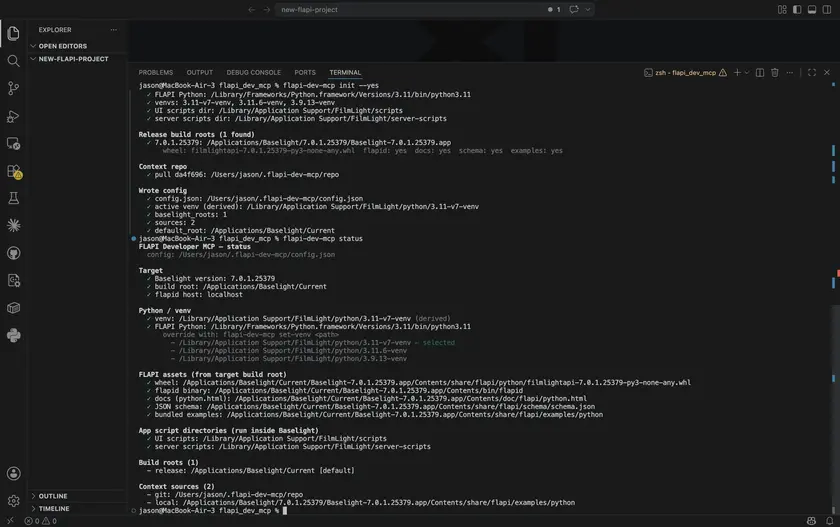
The connection tool, flapi_connection, probes what’s reachable on each port, presents the options with live status, and returns a tested connection snippet matched to the local state. The agent doesn’t have to guess.
Gather. On init the MCP clones the public FLAPI examples repo as a searchable source. It introspects the installed FLAPI package for class docs, method signatures, parameter types. It loads the auto-generated JSON schema. Everything is indexed for keyword search. For a corpus this size — a few hundred files — structured lookup and grep are faster, simpler, and more debuggable than embeddings.
Provision. For a standalone script, the MCP creates a per-project venv, installs the FLAPI wheel matched to the local Baselight build, and adds the script’s other dependencies. For an app script, it installs into the managed venv and deploys to the right scripts directory. The agent calls tools, the environment changes, the next call sees the new state.
Observe. For standalone scripts the MCP runs them and surfaces stdout, stderr, and any traceback. The agent sees the failure mode and adjusts. For app scripts a human still clicks the menu item to trigger a reload, but the MCP reads the log either way and feeds the result back.
What it produces
A dialogue contact sheet, two ways. Same task, two forms. The standalone is a dark-theme PDF: scene path as a CLI argument, Whisper transcription per line, one thumbnail per line at its midpoint with the line burned in. The app script backgrounds the Whisper transcription on Baselight’s QueueManager with a progress dialog, pulls thumbnails through the ThumbnailManager, and on completion stands up an HTTP server to serve the result as a dark webpage.
Both came together in two or three shots. Minutes of work, with only the occasional “also do X” from me.
 Generated by the app script. Footage courtesy Netflix Meridian.
I never told the agent which thumbnail API to use. For the standalone it chose Export-stills, found through the examples search. For the app script it switched to ThumbnailManager, found through introspection. ThumbnailManager is app-only. The agent reasoned the constraint out from what it had learned about the two script architectures.
Codex recently shipped Sites: the agent generates a web page and you get a link to share. The pattern of “agent builds a small piece of UI and hands you a URL” is starting to show up everywhere (MCP servers can render UI in-chat now too). The app script above does the local-server version of the same idea. A link to purpose-built content is going to be how a lot of agent output gets shared. Low friction, almost infinitely flexible.
A cursor-tracking TUI. Connects to the running Baselight session, polls the cursor position, and renders a graded thumbnail of the current frame in the terminal as you scrub. Scene name, version, and frame number along the side.
The MCP doesn’t write any of this. The agent does. The MCP gives it enough context to make the right calls.
What I learned
An MCP can do more than serve context, and that’s the biggest unlock. On init mine probes the live environment and provisions it: matching venv, installed wheel, reachable service, deployed examples. The agent doesn’t write code into an environment it has to assume. It writes into one it can actually see, that the MCP has already made ready. That’s the single biggest leverage point I found, and it’s the part most people don’t think to put in an MCP.
Context engineering beats prompt engineering. Once the agent has the right context, prompting is a small lever. Filling the context window with the right information is the work.
The MCP rides on the corpus underneath it. Mine re-clones the examples repo on every update. Every new script added to that repo makes the MCP smarter, for free. Build the context layer and let the corpus underneath grow.
The protocol carries. A colleague ran the MCP through OpenCode using Big Pickle, the local model that ships with it. It worked. Maybe not as fluently as Claude Code, but it worked, and for free. The MCP is agent-agnostic. What I encoded about FLAPI transfers to any client that speaks the protocol.
The agent is solved. The context is the product. General-purpose coding agents are commodity and they’re getting better fast. The leverage is in the domain layer. Don’t build agents. Build the context that makes agents domain-expert.
This is the kind of tool I’d build for any complex professional API. The pattern travels. I used the same approach to build a personal second brain.
The MCP was built with Claude Code. About 8 to 10 hours of concentrated effort.
The repo: github.com/JasonMakes801/flapi-dev-mcp